
Mail is your mailbox in the browser, with everything you need day to day and features for working as a team.
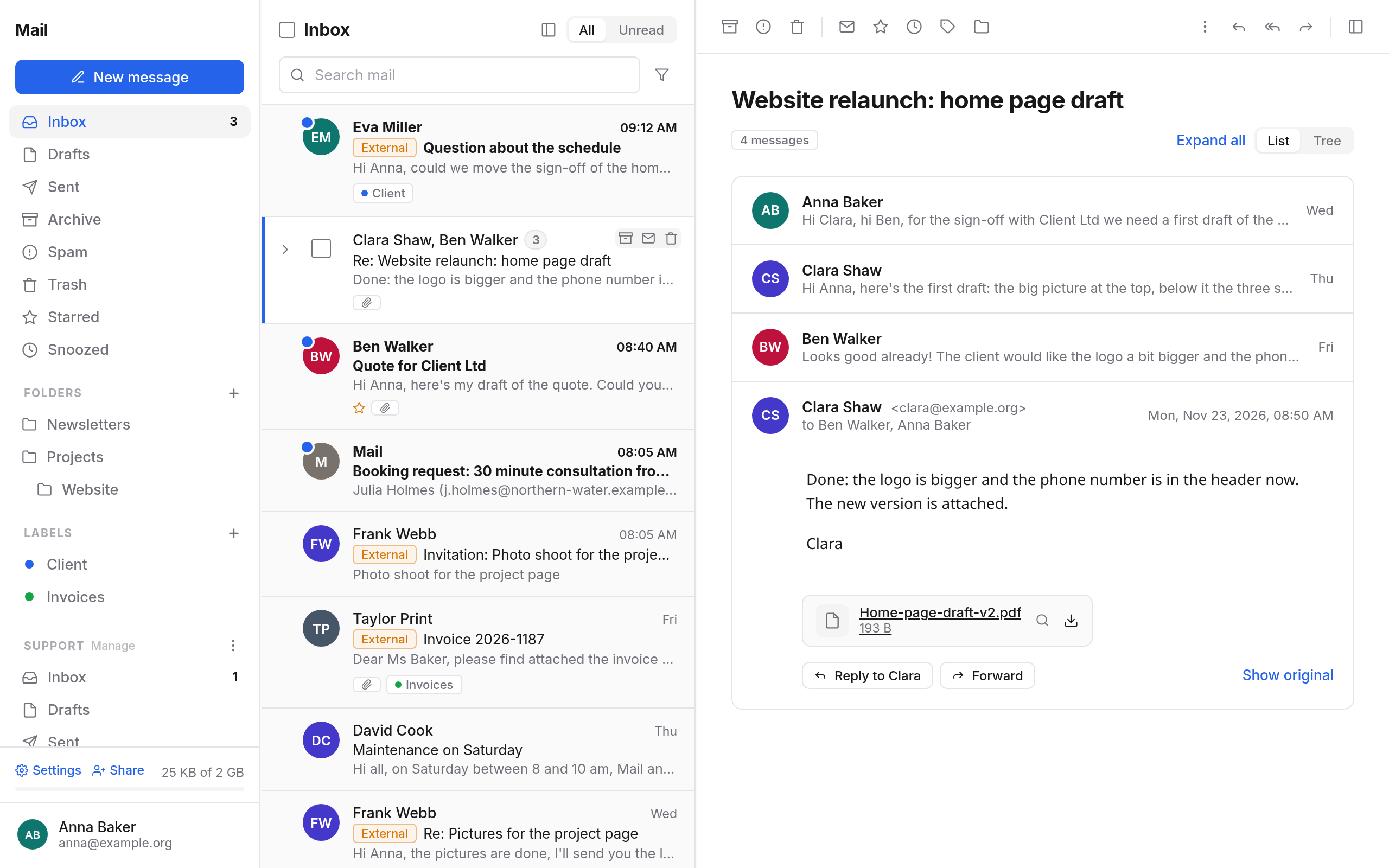
How Mail is laid out
- The sidebar on the left: New message at the top, then Inbox, Drafts, Sent, Archive, Spam and Trash, then Starred, Snoozed, your Saved searches, your Folders and Labels. Group mailboxes and mailboxes others have shared with you come below. At the very bottom are Settings, Share and how much storage you use.
- The message list in the middle: one row per conversation, with the search field at the top.
- The reading pane on the right: the open conversation.
Full-width reading hides the list while you read. More under Reading messages.
Reading and finding
- Reading messages: conversations as a List or a Tree, attachments, pictures from outside, invitations, read receipts, unsubscribing from newsletters.
- Searching: with fields such as
from:,subject:orhas:attachment, with filters and saved searches. - Folders and labels: sorting, starring, snoozing and muting conversations.
- Keyboard shortcuts: ? lists them all.
Writing
- Writing messages: sender, recipients, formatting, attachments, send later, undo, reminders, read receipts.
- Signatures and canned replies: one signature for mail inside your organisation, one for mail going outside. Mail switches by itself.
- Encrypting and signing with OpenPGP or S/MIME.
Sorting automatically
- Rules: move, label, mark as read, forward or delete messages as they arrive.
- Senders and spam: blocked senders go to Spam, trusted ones never do.
Out of office and forwarding
- Out of office: automatic replies for a period, with a reply of their own for senders outside your organisation. Your calendar shows you as away meanwhile.
- Forwarding: incoming mail goes to another address, with a copy kept in the mailbox if you like.
As a team
- Group mailboxes and shared mailboxes: read together, claim a conversation with I'll take it, write internal notes, see who is replying right now. Share your own mailbox for reading, sorting or writing on your behalf, until a date if you like.
- Distribution lists: manage members, let held posts through, accept people who ask to join.
Other mailboxes and files
- Other providers: fetch mailboxes from Gmail, iCloud and others into Mail and write from them.
- Import and export: keep a folder as an mbox file, or bring in mail from another program.
The mail settings
Open them with Settings at the bottom of the sidebar. Each tab has its own page:
| Tab | What you set there |
|---|---|
| General | Time to undo sending, the format of new messages, notifications, see Writing and Reading |
| Signatures | Names and signatures of your addresses, see Signatures |
| Canned replies | Texts to insert, see Canned replies |
| Encryption | OpenPGP keys and S/MIME certificates, see Encrypting |
| Out of office | Automatic replies, see Out of office |
| Forwarding | See Forwarding |
| Rules | See Rules |
| Senders | Blocked and trusted senders, see Senders |
| Other providers | Mailboxes at other providers, see Other providers |
| Lists | Only when you own a list or can join one, see Distribution lists |
Most changes take effect when you choose Save at the bottom of the dialog. Canned replies, keys, other providers and lists are saved straight away.
On your phone and in other programs
On your phone, in Thunderbird or Outlook you use Mail through IMAP and SMTP, with an app password. See App passwords and Devices. Folders, labels and group mailboxes show up there too.
In this section
- Reading messagesReading conversations as a list or a tree, with attachments, pictures, invitations, read receipts and unsubscribing.
- SearchingFinding mail by words, sender, subject, date, folder and label, with filters and saved searches.
- Writing messagesWriting new messages, replies and forwards, with attachments, send later, undo, reminders and read receipts.
- Signatures and canned repliesOne signature for mail inside your organisation, one for mail going outside, and canned replies for answers you write often.
- Folders and labelsSorting mail into folders and with labels, starring it, snoozing it and muting conversations.
- RulesMove, label, mark, forward or delete incoming mail automatically.
- Out of officeAutomatic replies while you are on holiday or ill, with a reply of their own for senders outside.
- ForwardingForwarding incoming mail to one or more other addresses, with or without a copy kept in the mailbox.
- Senders and spamMarking spam, blocking senders or entering them as trusted.
- Group mailboxes and shared mailboxesUsing shared mailboxes such as support@, sharing your own mailbox, and working as a team: assigning, notes, who is replying.
- Distribution listsWriting to lists such as team@, and as an owner managing members, letting held posts through and accepting people who ask to join.
- Mailboxes at other providersFetching mailboxes from Gmail, iCloud, GMX and other providers into Mail, and writing from them.
- Encrypting and signingEncrypting and signing mail with OpenPGP or S/MIME, making or importing keys, reading encrypted mail.
- Import and exportKeeping a folder as an mbox file, or bringing in mail from Thunderbird, Apple Mail or Google Takeout.
- Keyboard shortcutsGetting through Mail with the keyboard: opening, archiving, deleting, replying and more.