
File formats
Docs reads and writes the formats of Microsoft Office and LibreOffice. But a document in Docs is not a file: it lives on the server, and everyone works on it. A file only comes into being when you download one. Anything changed after that is not in it.
At a glance
| App | Opens | Saves |
|---|---|---|
| Sheets | .xlsx, .xlsm, .ods, .csv, .tsv, .txt | .xlsx, .ods, .csv, PDF |
| Writer | .docx, .dotx, .odt | .docx, .odt, EPUB, PDF |
| Slides | .pptx, .potx, .ppsx, .pptm, .odp, .otp | .pptx, .odp, PDF, PNG (one picture per slide), MP4 |
All conversion happens in your browser. Your files don't go to any outside service.
Opening
The usual way is Upload in the overview: the file becomes a new document. For formats the overview doesn't offer, there is a way in the app:
| App | Command | What happens |
|---|---|---|
| Writer | File → Open a document (.docx, .odt) | The file's content replaces the content of the open document, for everyone. .dotx templates open this way too. ++Ctrl+Z++ takes it back. |
| Slides | File → Open a presentation… | The file becomes a new document, which opens straight away. .potx, .ppsx, .pptm and .otp too. |
If Writer finds something in a file that it can't show, it tells you what after opening.
Downloading
| App | Where | Formats |
|---|---|---|
| Sheets | File → under Export as | Excel workbook (.xlsx), OpenDocument (.ods), CSV (.csv)… |
| Sheets | File → Print → PDF… | |
| Writer | File | Download as a Word document (.docx), Download as an ODF text document (.odt), Download as PDF, Download as EPUB |
| Slides | File | Download as PowerPoint (.pptx), Download as OpenDocument (.odp), Download as PDF, Download slides as pictures (.zip of PNG), Create a video… |
The file name is the document's title.
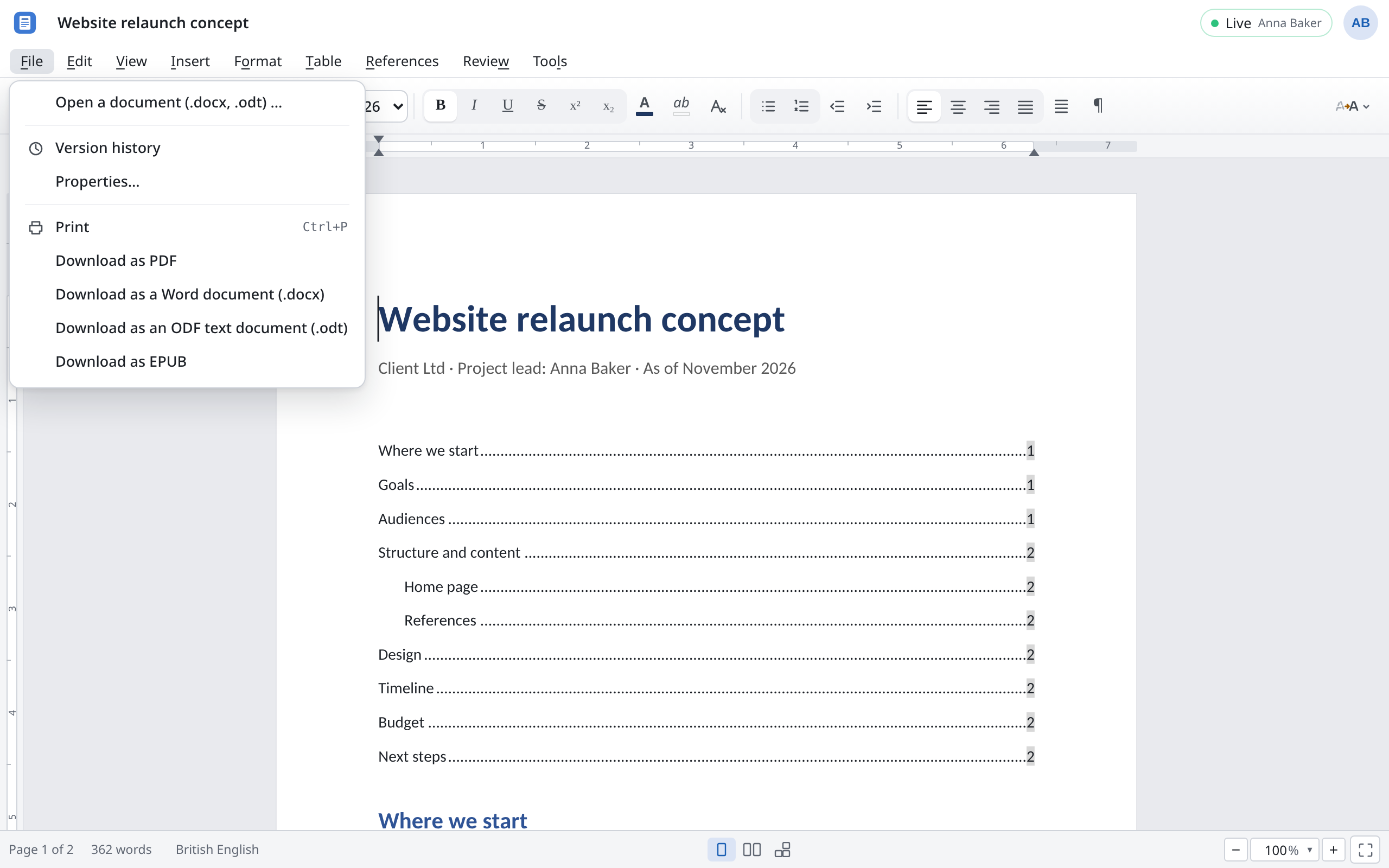
PDFs from Docs contain real text that can be selected and searched, and the document's fonts.
- In Sheets, the Print dialog sets what goes into the PDF: Active sheet, Entire workbook or the Selection, plus paper size, orientation, margins and scaling such as Fit sheet on one page. Then choose PDF….
- In Writer, the PDF is exactly what you see on screen, with the same page breaks.
- In Slides, each slide goes on a page of its own.
CSV
CSV (.csv)… saves the current sheet, with the values as the cells show them, not the formulas. In the dialog you choose the separator (Comma, Semicolon, Tab or Space) and whether to Quote all fields. The file is UTF-8, so accented letters arrive correctly in any program.
EPUB
Download as EPUB turns a Writer document into an e-book for reading apps and e-readers, where the text reflows to fit the screen. An EPUB file can't be opened in Docs again; keep the document in Docs for later changes.
Pictures and video
Download slides as pictures (.zip of PNG) gives you a ZIP archive with one PNG picture per slide, for a website or a chat, say. How to make a video of the presentation is under Slides.
What happens on the way in and out
Docs is built so that a file comes out of Docs the way it went in. A few things still behave differently:
| What | What happens |
|---|---|
Macros (VBA) in .xlsm and .pptm | Removed on opening and not saved again. Docs doesn't run macros. |
| Fonts | If a font such as Calibri or Cambria is missing, Docs uses a substitute of the same width, so lines and pages break where they do in Office. The Fonts in this document icon in the toolbar shows which fonts a document uses and what replaces them. |
Formulas in .xlsx | Saved without their computed results. Excel and LibreOffice recalculate on opening. A preview that doesn't calculate (in some email programs, say) shows the cells empty. |
| Split windows in Sheets | Become frozen rows and columns in Excel. |
| PowerPoint animations | Those Slides can't play become a fade or are dropped. |
| SmartArt with an unusual layout | Saved as individual shapes. |
ODF (.odt, .ods, .odp) | Has no floating tables, no table styles and no tracked formatting changes. These are lost when saving as ODF. Chart labels in .ods are approximations. |
| Other formats | Docs doesn't open RTF, Markdown or the old .doc, .xls and .ppt formats. Save them as .docx, .xlsx or .pptx in Office or LibreOffice first. |
| Comments | Come along, both ways. |
| Version history | Stays in Docs. The downloaded file holds only the current version. |
What Docs can't edit but mustn't lose, it keeps unchanged and writes back into the file, such as embedded OLE objects in Word or data models in Excel.